
(Adam Goldberg) Welcome to the end of the 2010’s decade. In retrospect, can you believe how quickly it passed? It was back in 2013 that Edward Snowden leaked all that info about surveillance. It was the very beginning of this decade when both social media and smartphones really started popping, or the very end of the last decade if you get down to it.
Related How Facebook Has Been Collecting Call & SMS History From Android Devices
by Adam Goldberg, November 8th, 2018
By now, people who are ignorant to the capabilities of mass surveillance are fatally far behind in their understanding. We’re going to go over the basics, and then we’re going to go over realistically exactly what surveillance everybody is probably under at all times nowadays.
In 2015, it was reported that Google keeps an audio log of all the different questions you ask its voice search function. If you go online to a certain page in your Google account, you can listen to all those questions you answered.

(Image credit: QZ)
The thing is, that voice search thing turns on by itself all the time, it’s known to do that in a person’s pocket. So, headlines started circulating in 2015 about how Google is secretly recording everything we say, but the articles were a little bit misleading because they made it seem as if Google was indiscriminately recording everything we say, whether we use the voice function at all.
Buy Book The Future of Foreign Intelligence: Privacy and Surveillance in a Digital Age (Inalienable Rights)
In June 2015, Google launched a new portal where a user can find Google account-related activities.
Stillness in the Storm Editor: The following walkthrough doesn’t work any more, as the menus have changed. But you can still see and remove history from your profile by going to history.google.com. If you find another method of accessing voice recordings, please send me that information at [email protected].
Update: A reader was kind enough to send screenshots of how to access the audio screens. See the end of this article for that information.
– Justin
Here is how to delete your Google recordings.
1. VISIT THE PAGE HISTORY.GOOGLE.COM, AND MAKE SURE YOU’RE LOGGED IN.
2. ON THE TOP LEFT SIDE OF THE PAGE, CLICK THAT HAMBURGER ICON.
3. GO TO THE “VOICE & AUDIO ACTIVITY” SECTION.
4. GO THROUGH YOUR LIST, AND YOU’LL FIND ALL THE THINGS YOU ASKED ON RECORDING.
5. CLICK A SQUARE, AND YOU CAN SELECT A RECORDING TO DELETE.
6. STOP USING THAT VOICE FUNCTION IF YOU DON’T WANT TO BE RECORDED.
The thing is, people suspect that surveillance is taking place on all people who use smart phones, as long as the microphone is exposed, because several apps openly say they reserve the right to record you.
What Google records in this way pales in comparison to what people suspect but may not be able to concretely prove, and that would be exactly the point. It is suspected that intelligence agencies like the NSA are tapped into our phone microphones.

(Image credit: libertylawsite)
It’s difficult to prove, but it’s common sense: who knows who is capable of accessing our cameras and microphones. Everybody around us is a walking surveillance tool, everyone has a phone, and even if your own phone has a taped microphone and camera, what if the person next to you in a coffeeshop is using a phone like normal, with the camera exposed?
Buy Book Mind Wars: Brain Science and the Military in the 21st Century
The potential for a complete surveillance grid is undeniable. At this moment, it doesn’t seem that surveillance footage captured via a smart phone like this without the knowledge or permission of an individual is evidence that can be used in court, but the day that lawmakers decide that is an okay way to convict someone of a “crime,” a threshold will be crossed that we will never be able to come back from when it comes to mass surveillance.

(Image credit: Death Grips)
Buy Book Mind Control: Human Psychology, Manipulation, Persuasion and Deception Techniques Revealed
Reader Submitted Voice Access Process:
Log into history.google.com > Activity controls (on left margin) > scroll down to “Voice and Audio activity” > then click Manage Activity.
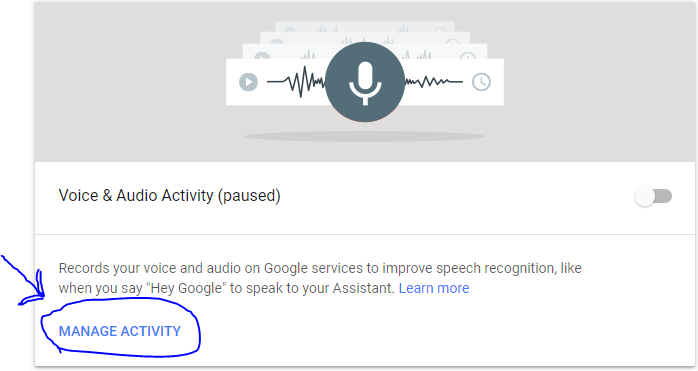
You will get something similar to the following screen which is where I believe the items will be listed, but I don’t have any voice history or google assistant, so I have nothing listed there:
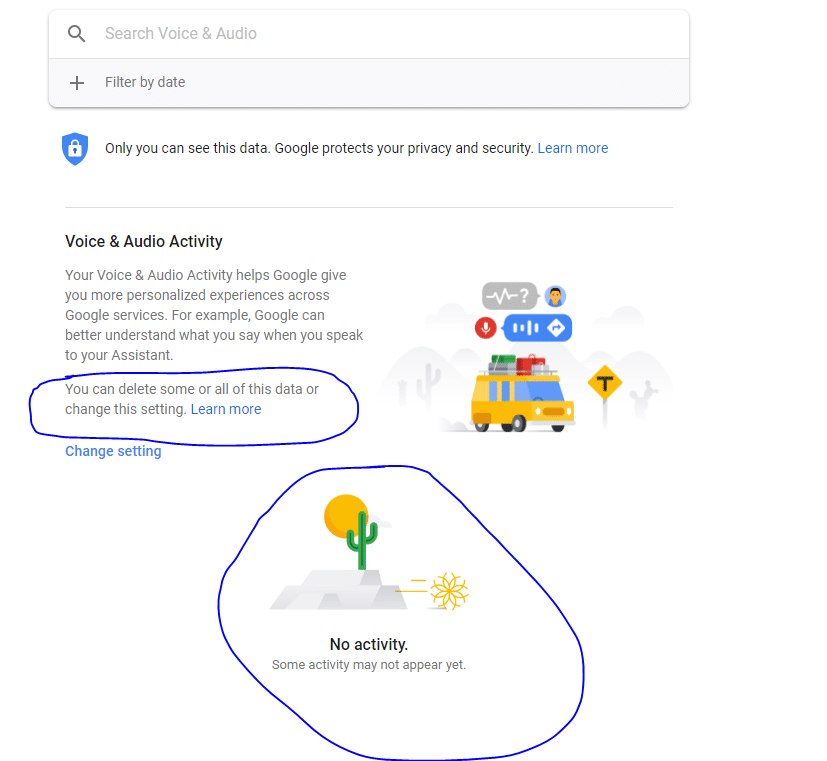
Again, I’m not positive about this but I believe it to be accurate and by extension helpful (hopefully).
Not sure how to make sense of this? Want to learn how to discern like a pro? Read this essential guide to discernment, analysis of claims, and understanding the truth in a world of deception: 4 Key Steps of Discernment – Advanced Truth-Seeking Tools
Stillness in the Storm Editor’s note: Did you find a spelling error or grammar mistake? Send an email to [email protected], with the error and suggested correction, along with the headline and url. Do you think this article needs an update? Or do you just have some feedback? Send us an email at [email protected]. Thank you for reading.
Source:
Leave a Reply